# 变量命名转换助手 — Variable Conversion (VSCode 扩展)
[Marketplace](https://marketplace.visualstudio.com/items?itemName=coder-xiaomo.variable-conversion) [GitHub](https://github.com/coder-xiaomo/variable-conversion-vscode-extension.git) [Gitee](https://gitee.com/coder-xiaomo/variable-conversion-vscode-extension.git)
一个强大的变量命名及路径风格转换插件,支持一键转换、循环转换,支持右键菜单、快捷键、状态栏等多种方式使用。
A powerful variable and path conversion extension. Supports one-key conversion & cyclic conversion. You can use it through the editor menu, shortcut keys and status bar.
> **【近期更新】**
>
> **v2.2.0 (2025-12-05)**
>
> - 支持配置目标转换格式顺序
> - 支持展示当前配置的格式顺序信息弹窗,可显示配置重复项和无效项
> - 支持从弹窗中点击按钮快捷跳转至设置页对应配置项
>
> **v2.1.0 (2025-07-14)**
>
> - 支持仅开启部分目标转换格式 (优化 VSCode 配置项)
>
> **v2.0.0 (2024-12-15)**
>
> - 支持 Windows / Unix 路径风格转换(可选中文本中的路径,然后使用 `Ctrl + Alt + /` 快捷键,或点击右键菜单、底部状态栏路径转换按钮轻松实现转换)
- ✅ 支持多选区 Support multi-selection
- ✅ 支持多窗口 Support subwindow
- ✅ 支持撤回 & 重做 Support undo & redo (Ctrl + Z / Ctrl + Y)
- ✅ 支持仅开启部分目标转换格式 Support enabling only partial target conversion formats
> 🔭 Tips for Chinese users: 如果您无法看到下文图片,请[点这里](https://gitee.com/coder-xiaomo/variable-conversion-vscode-extension/blob/main/README.md)查看
## 如何使用? How to Use?
### 循环转换 Cyclic conversion
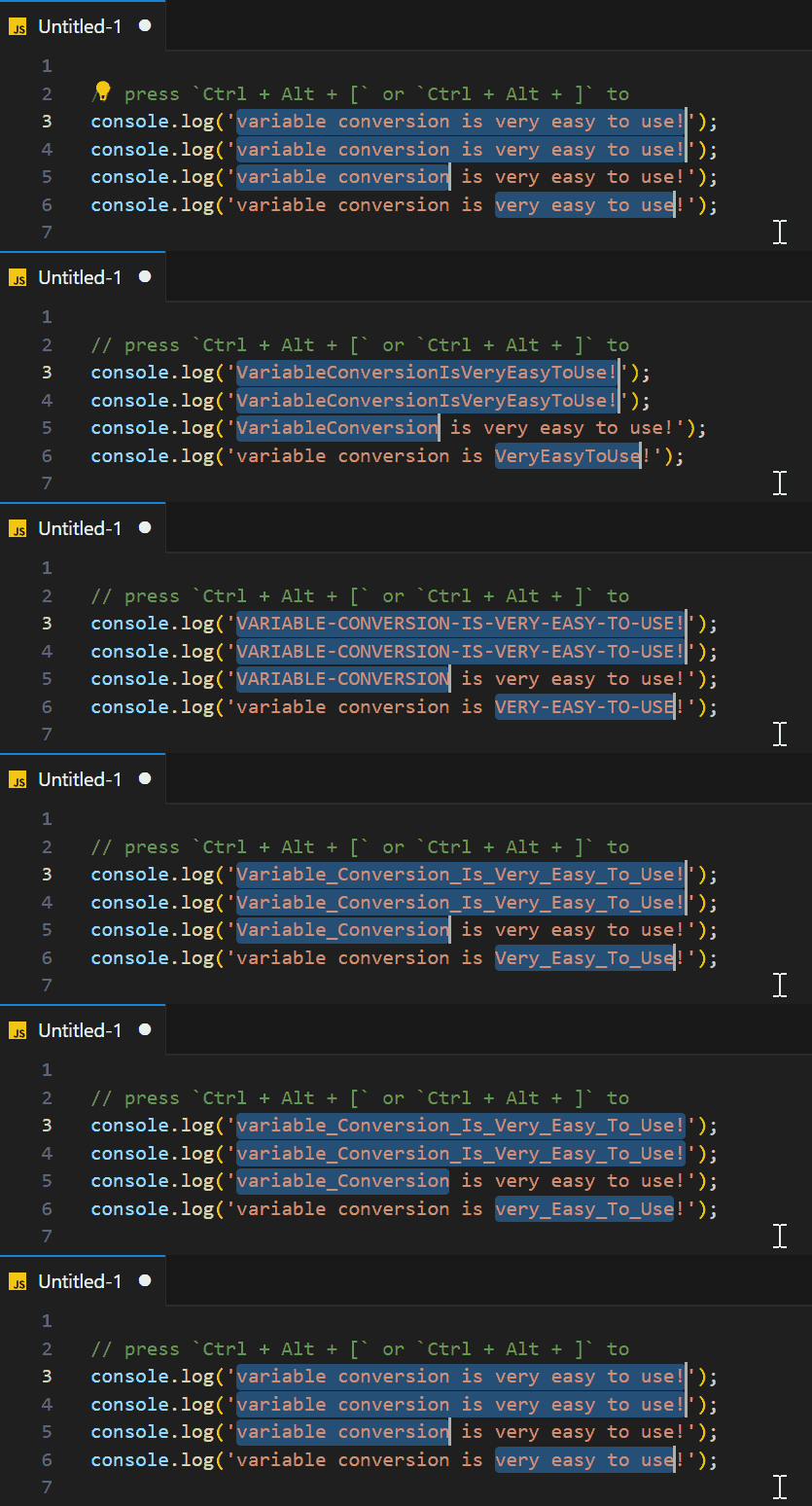
选中需要转换的内容,然后按下 `Ctrl + Alt + [` 或 `Ctrl + Alt + ]` 即可前后灵活切换变量命名方式。
Select what you want to convert in the editor, and then press `Ctrl + Alt + [` or `Ctrl + Alt + ]` to flexibly convert variable name flexibly.
### 基础转换 Basic conversion
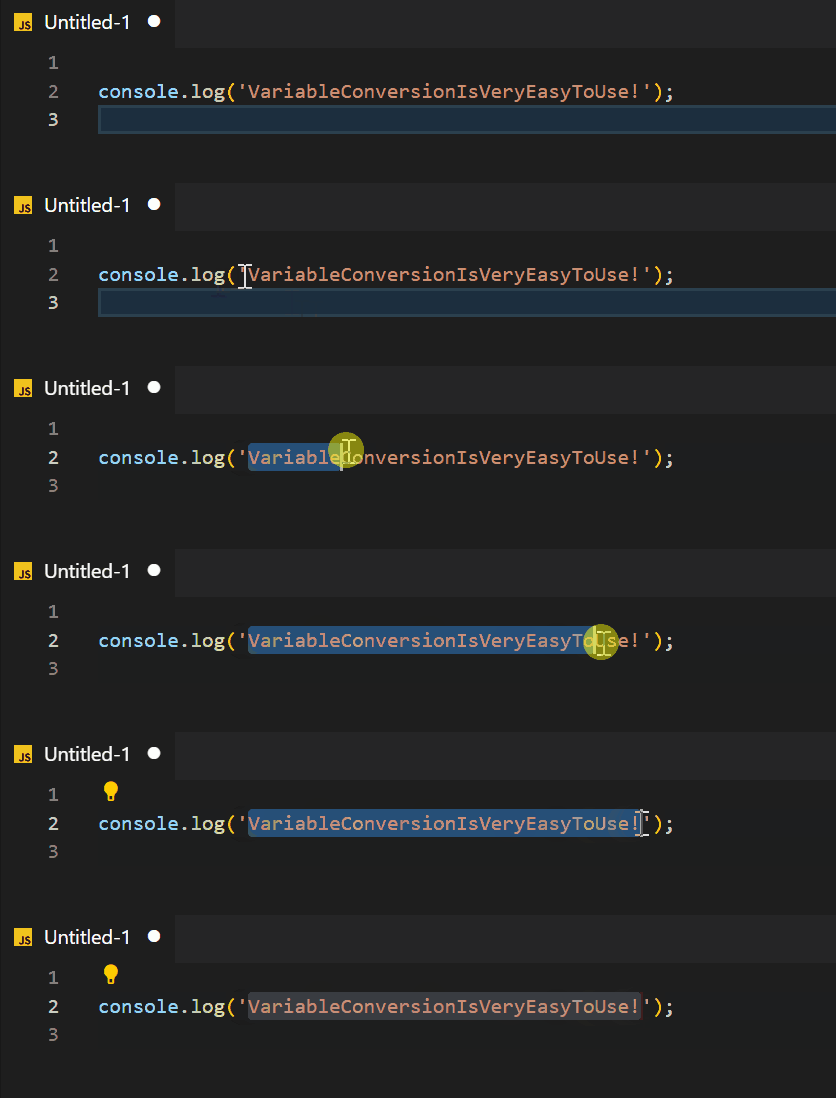
**1. 选中代码中需要转换的内容** **Select The Text To Convert**
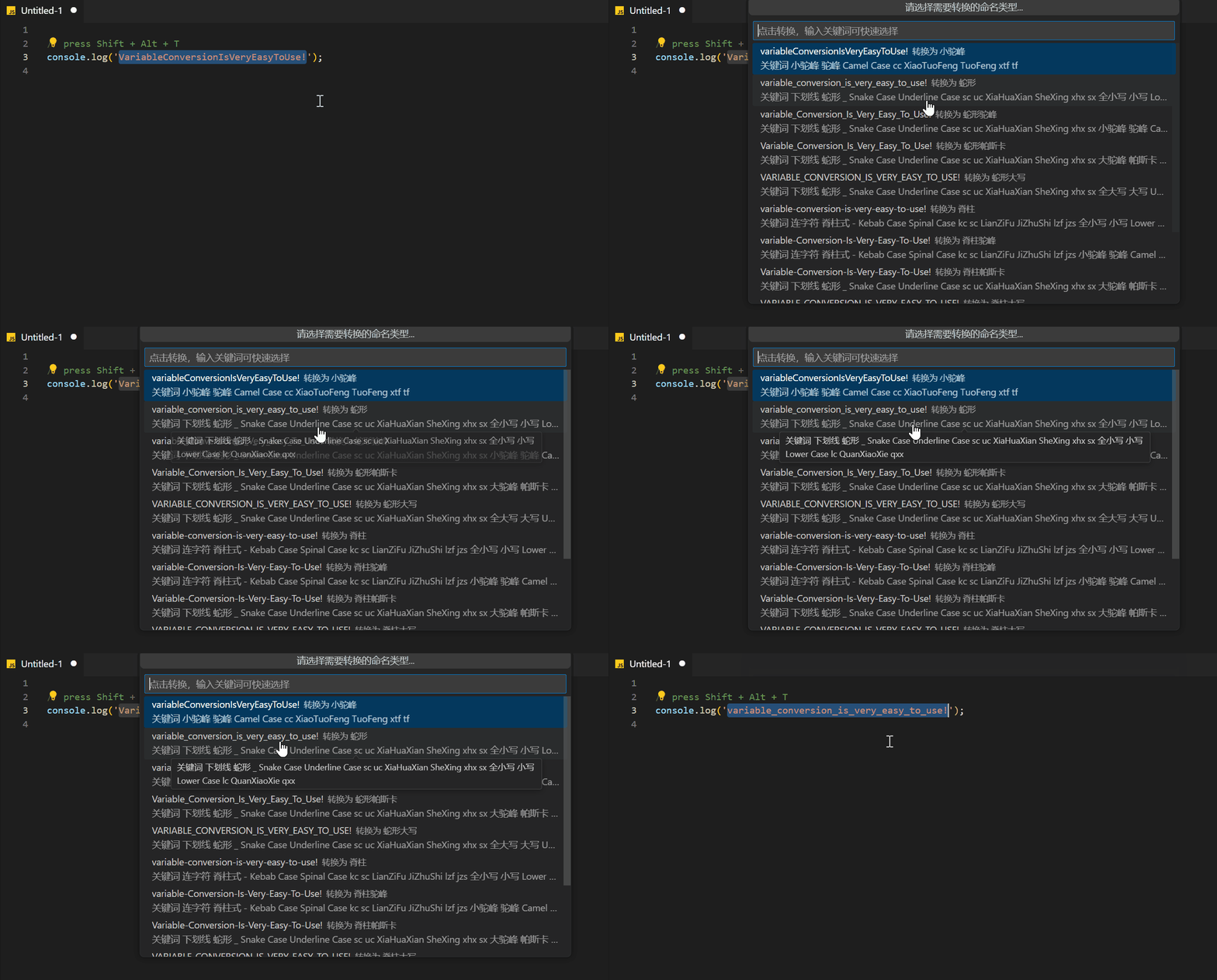
**2. 按 `Shift + Alt + T`** **Press `Shift + Alt + T`**
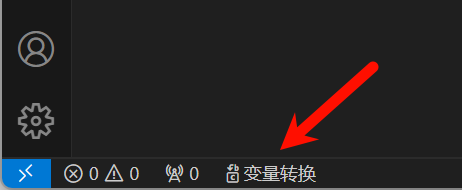
或者点击状态栏的 `变量转换` 按钮
Or click the `String Conversion` button in the status bar
或者右键 -> `变量转换`
Or right-click -> `String Conversion`

或者右键 -> 将变量转换为...
Or right-click on the selected text -> Convert string to...
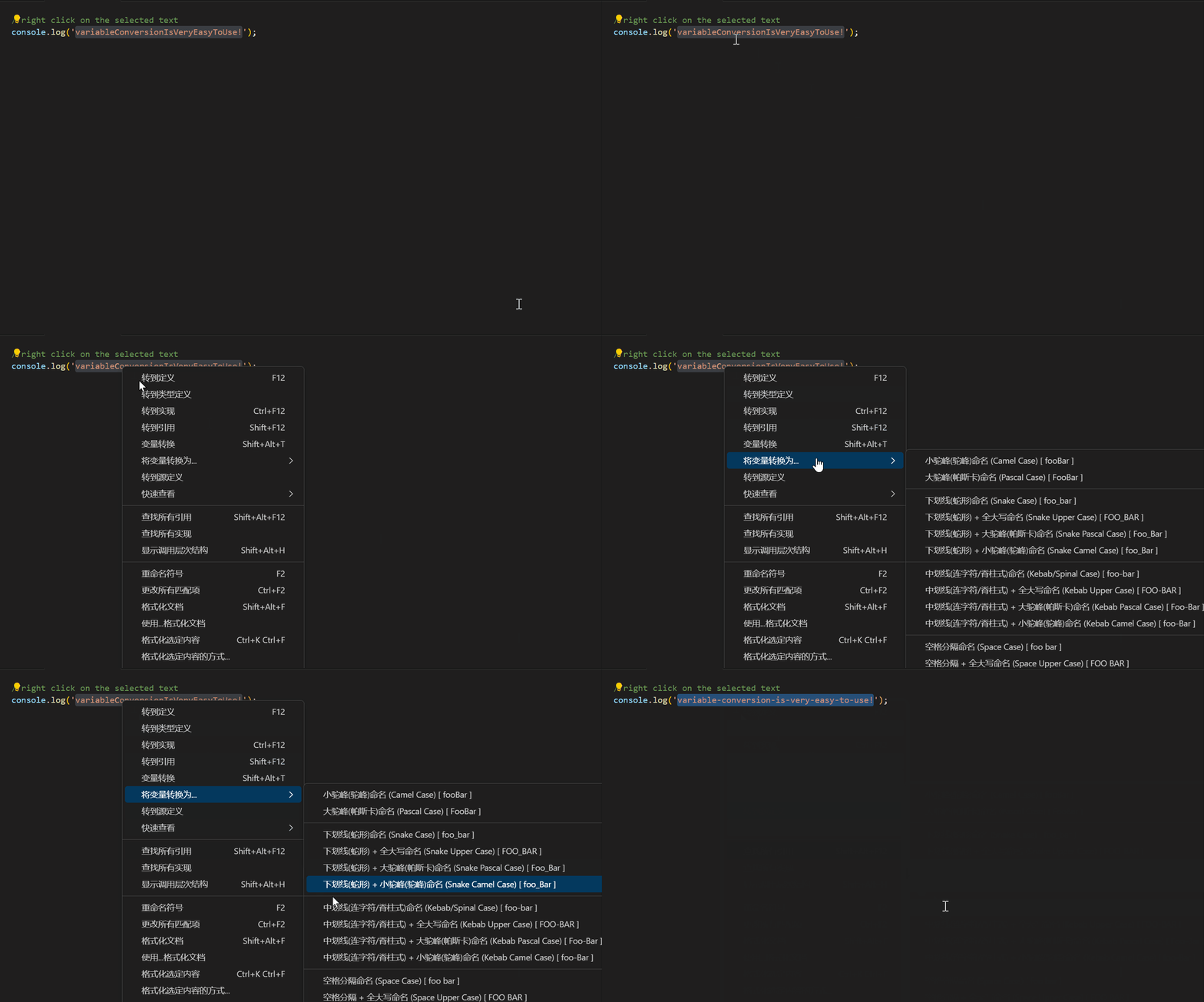
**3. 选择转换目标,转换完成** **Select the conversion target and complete**
### 路径转换 Path Conversion (Beta)
> 该功能仍在 Beta 测试阶段,如您在使用过程中遇到问题,欢迎通过文末联系方式进行反馈。
>
> This feature is still in Beta testing stage, if you encounter any problems during use, please give feedback via the contact information at the end of the article.
路径转换与变量转换操作逻辑基本相同,都可以通过 *右键菜单*、*底部状态栏*、*快捷键* 等方式使用,唯一区别是快捷键的不同。
路径转换快捷键为:
- 切换下一个路径风格:`Ctrl + Alt + /`
- 切换上一个路径风格:`Ctrl + Alt + Shift + /`
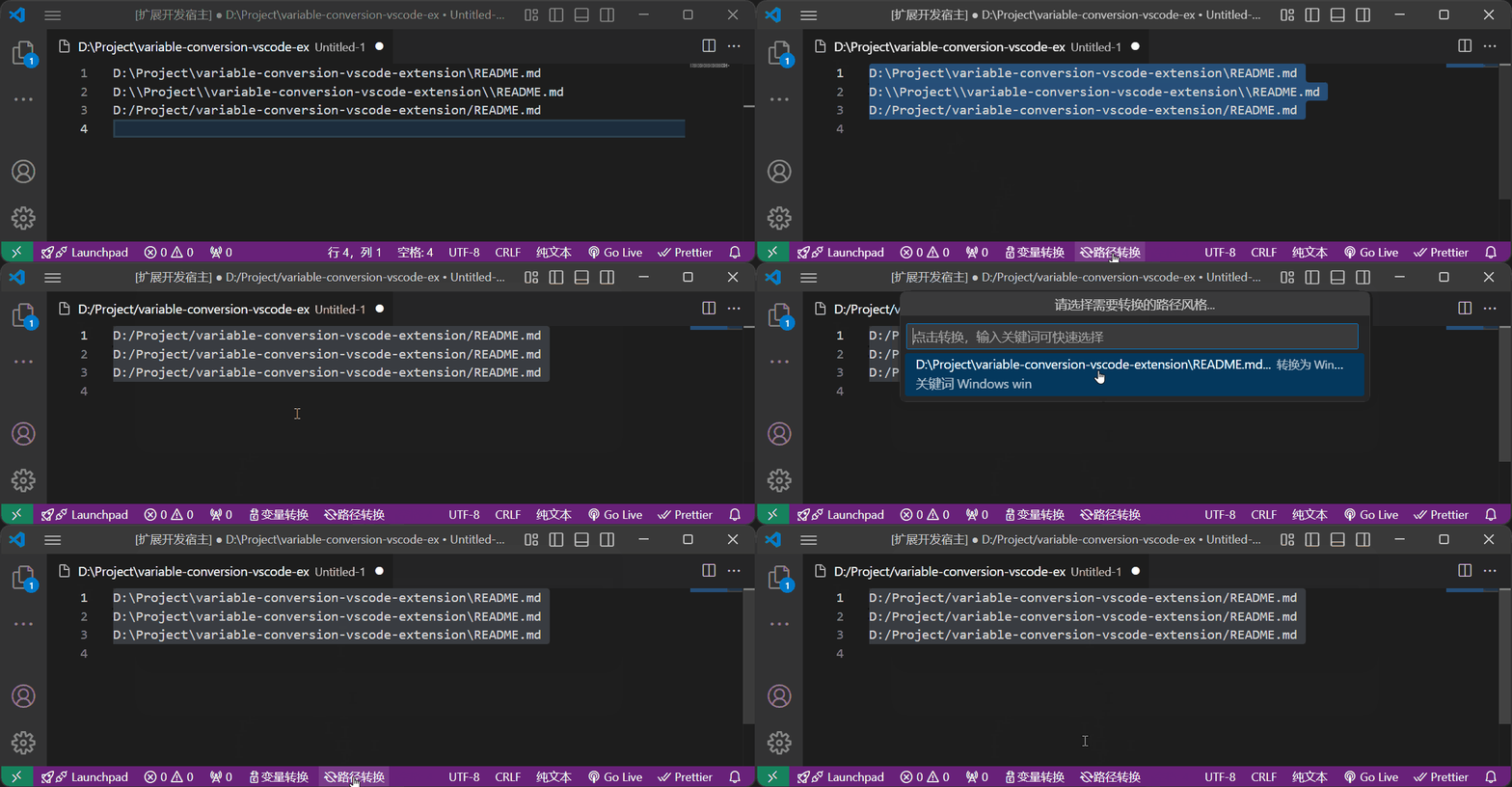
**注:** 目前 `v2.0.0` 版本暂仅支持 `Windows 风格路径` 与 `Unix 风格路径` 互转,所以这两个快捷键目前效果相同。**后续会陆续增加其他更多路径风格**(例如 `Windows Git Bash` 风格,浏览器 `file://` 协议风格等),敬请期待。
## 快捷键 Shortcut key
| 功能 Feature | 快捷键 shortcut key |
| ------------------------------------------------------------ | ---------------------- |
| 变量转换 快速选择 Variable Conversion QuickPick | Shift + Alt + T |
| 变量循环转换→上一个 Variable Cyclic Conversion → Previous one | Ctrl + Alt + [ |
| 变量循环转换→下一个 Variable Cyclic Conversion → Next one | Ctrl + Alt + ] |
| 显示格式顺序信息弹窗 Show Format Order Info Dialog | Ctrl + Alt + \` |
| 路径转换 快速选择 Path Conversion QuickPick | Shift + Alt + / |
| 路径循环转换→上一个 Path Cyclic conversion → Previous one | Ctrl + Alt + / |
| 路径循环转换→下一个 Path Cyclic conversion → Next one | Ctrl + Shift + Alt + / |
> 若您觉得快捷键使用不顺手,您可在 VSCode 左下角齿轮图标⚙ → 键盘快捷方式中自定义修改快捷键。
## 配置项 Configurations
| 配置项 Configuration Key | 描述 Description | 配置示例 | 默认值 |
| --------------------------------------- | ------------------------------------------------------------ | ----------------------------------------------- | -------- |
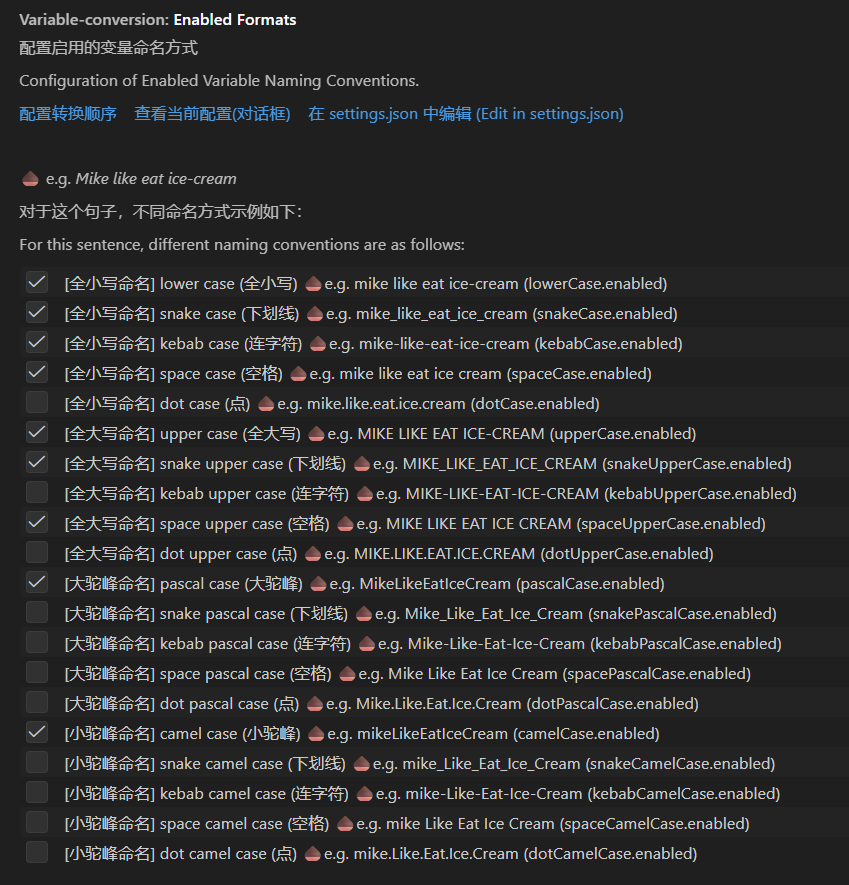
| `variable-conversion.enabledFormats` | 配置启用的变量命名方式
Configuration of Enabled Variable Naming Conventions. | `{ "xxxCase.enabled": boolean, ... }` | 见配置项 |
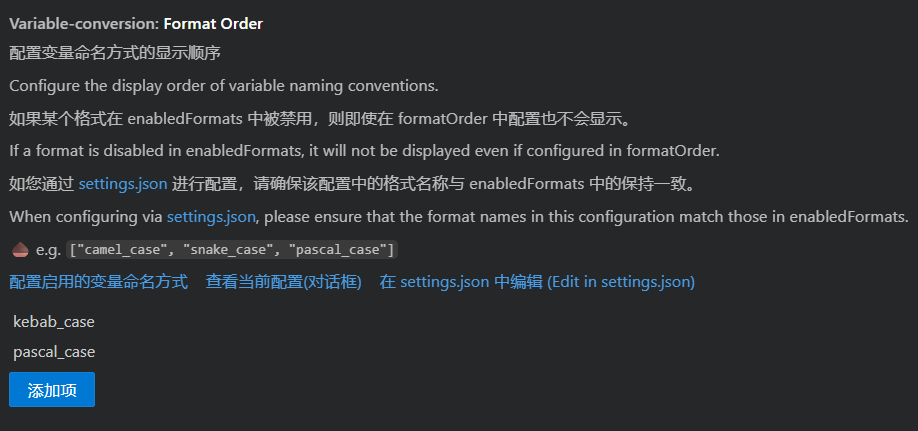
| `variable-conversion.formatOrder` | 配置变量命名方式的显示顺序
Configure the display order of variable naming conventions. | `[ "camel_case", "pascal_case", "snake_case" ]` | 见配置项 |
| `variable-conversion.disablePathFormat` | 定义哪些路径风格是禁用的
Define which path formats are disabled. | `["windows_style", "unix_style"]` | 见配置项 |
配置项如下:
| Enabled Formats 配置 |
Format Order 配置 |
 |
 |
| Disable Path Format 配置 |
|
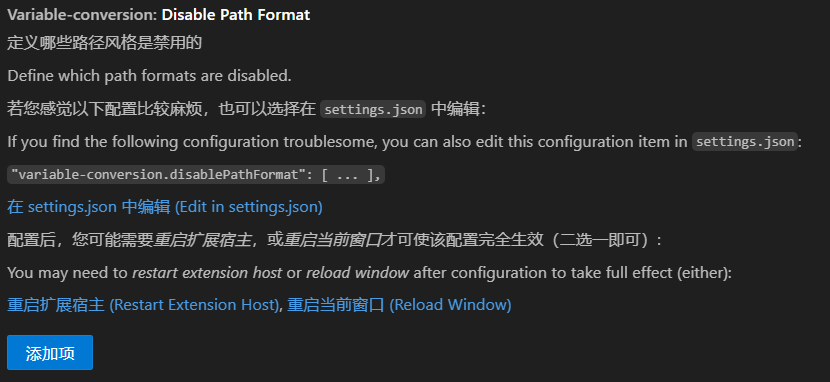 |
|
## 支持的类型 Support Case
### 变量转换
| 类型 | Case | 举例 e.g. |
| ------------------------------------------ | ------------------------ | ---------------- |
| 小驼峰(驼峰)命名 | Camel Case | fooBar |
| 大驼峰(帕斯卡)命名 | Pascal Case | FooBar |
| 下划线(蛇形)命名 | Snake Case | foo_bar |
| 下划线(蛇形) + 小驼峰(驼峰)命名 | Snake Camel Case | foo_Bar |
| 下划线(蛇形) + 大驼峰(帕斯卡)命名 | Snake Pascal Case | Foo_Bar |
| 下划线(蛇形) + 全大写命名 | Snake Upper Case | FOO_BAR |
| 中划线(连字符/脊柱式)命名 | Kebab Case / Spinal Case | foo-bar |
| 中划线(连字符/脊柱式) + 小驼峰(驼峰)命名 | Kebab Camel Case | foo-Bar |
| 中划线(连字符/脊柱式) + 大驼峰(帕斯卡)命名 | Kebab Pascal Case | Foo-Bar |
| 中划线(连字符/脊柱式) + 全大写命名 | Kebab Upper Case | FOO-BAR |
| 空格分隔命名 | Space Case | foo bar |
| 空格分隔 + 小驼峰(驼峰)命名 | Space Camel Case | foo Bar |
| 空格分隔 + 大驼峰(帕斯卡)命名 | Space Pascal Case | Foo Bar |
| 空格分隔 + 全大写命名 | Space Upper Case | FOO BAR |
| 点分隔命名 | Dot Case | foo.bar |
| 点分隔 + 小驼峰(驼峰)命名 | Dot Camel Case | foo.Bar |
| 点分隔 + 大驼峰(帕斯卡)命名 | Dot Pascal Case | Foo.Bar |
| 点分隔 + 全大写命名 | Dot Upper Case | FOO.BAR |
| 全小写 | Lower Case | foo_bar / foobar |
| 全大写 | Upper Case | FOO_BAR / FOOBAR |
### 路径转换
现已支持的路径风格:
| 路径风格 | Style | 举例 e.g. |
| ------------ | ------------- | ---------------------------------------------- |
| Windows 风格 | Windows Style | `C:\Windows\System32`
`.\public\assets\` |
| Unix 风格 | Unix Style | `/usr/bin`
`./public/assets/` |
尚未支持的路径风格:
| 路径风格 | Case | 举例 e.g. |
| -------------------------- | --------------------------------- | ------------------------------------- |
| 👇未来计划支持 | | |
| Windows 风格(反斜杠转义) | Windows Style (Backslash Escaped) | `C:\\Windows\\System32` |
| Unix 风格(反斜杠转义) | Unix Style (Backslash Escaped) | `\/usr\/bin` |
| Windows Git Bash 风格 | Windows Git Bash Style | `/c/Windows/System32` |
| 👇未来可能支持 | | |
| 浏览器 `file://` 协议风格 | | `file:///C:/Program%20Files%20(x86)/` |
## 小提示 Tips
#### 关于文本选区... About text selections...
- 可以先按住 `Alt` 键不放,再鼠标先后选中多个选区
You can first hold down `Alt`, and then use the mouse to select multiple selection
- 可以先按住 `Shift + Alt` 键不放,再按下鼠标左键,使用鼠标滑过需要选中的区块
You can first hold down `Shift + Alt`, then press the left mouse button, and use the mouse to slide over the block that needs to be selected
- 可以通过 `Ctrl + D` 快捷键选中光标所在的单词
You can press `Ctrl + D` to select the word near the cursor
## 反馈 Feedback
如果您觉得本插件还不够好用,有更好的使用建议;或者发现了 BUG,欢迎[前往 GitHub 仓库提 issue](https://github.com/coder-xiaomo/variable-conversion-vscode-extension/issues). 使用简体中文、繁體中文或 English 均可,不建议使用翻译软件翻译,否则可能会让文字描述变得抽象难懂。
If you feel that this extension is not good to use, or you have a better use suggestion, or found a BUG, welcome to [create an issue on GitHub](https://github.com/coder-xiaomo/variable-conversion-vscode-extension/issues). English, 简体中文 or 繁體中文 are all supported, it is not recommended to use translation software, otherwise it may make the text description become abstract and difficult to understand.
## 开源共建 OpenSource & Contribute
本插件已开源(MIT License),欢迎提 Pr 共建,让插件变得更好用!
This plug-in has been open source (MIT License), welcome to Pr co-construction, let the plug-in become better!
GitHub Repo (开源地址): https://github.com/coder-xiaomo/variable-conversion-vscode-extension.git
Gitee Mirror (码云镜像): https://gitee.com/coder-xiaomo/variable-conversion-vscode-extension.git
-----
**玩得开心!**
**Enjoy!**